

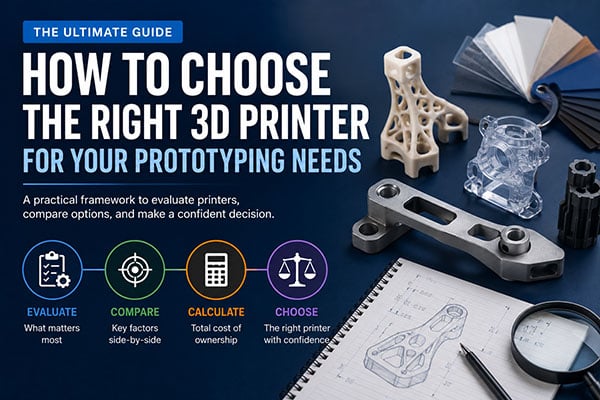
Rapid prototyping has become essential to modern product development. Engineering teams now expect to turn CAD files into physical parts in hours, not weeks—and the right 3D printer makes that possible. But with dozens of technology types, resolution specs, and material options available, choosing the right system for your workflow can feel overwhelming.
This guide walks you through every factor that matters when selecting a 3D printer for rapid prototyping. You'll learn how to evaluate print technologies, assess accuracy and throughput requirements, and match printer capabilities to your engineering workflow. B9Creations offers high-speed DLP 3D printers designed to deliver the precision and turnaround that prototyping specialists demand.
By the end of this guide, you'll have a clear framework for comparing 3D printers and making a confident investment decision.
Key Takeaways: How to Choose a 3D Printer for Rapid Prototyping
- Match your 3D printing technology to your prototype's accuracy, surface finish, and material property requirements.
- Evaluate print speed and throughput together—fast layer times mean nothing if post-processing adds hours to each build.
- B9Creations' DLP printers deliver up to 4x faster printing speeds, helping engineering teams accelerate iteration cycles.
- Consider total cost of ownership, including materials, maintenance, and operator training—not just the initial purchase price.
- Test workflow integration before buying: the right printer fits your existing CAD and post-processing pipeline without friction.
What Is Rapid Prototyping and Why Does Technology Choice Matter?
Rapid prototyping refers to the techniques used to quickly fabricate physical parts from 3D digital designs. The goal is simple: get something in your hands fast enough to test, refine, and move forward. For engineering teams, this means catching design issues early, validating form and fit, and reducing expensive late-stage revisions.
Your choice of 3D printer directly impacts how quickly you can iterate. A printer that delivers high accuracy but takes 12 hours per build creates bottlenecks. One that prints fast but lacks the resolution for functional testing forces you to outsource critical prototypes. The right match accelerates your entire development timeline.
According to research from AvidPD, teams that use rapid prototyping effectively can test multiple design variations in the time traditional manufacturing would take to produce a single part. This speed advantage compounds across development cycles, translating to faster time-to-market and lower overall project costs.
How Do Different 3D Printing Technologies Compare for Rapid Prototyping?
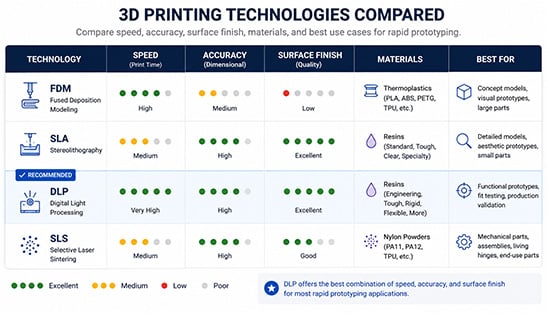
Understanding the core 3D printing technologies helps you narrow down which systems fit your prototyping needs. Each technology involves trade-offs between speed, accuracy, surface finish, and material options.
Fused Deposition Modeling (FDM)
FDM printers extrude melted thermoplastic filament layer by layer. They're widely accessible and work well for early-stage concept models where surface finish isn't critical. However, visible layer lines and lower dimensional accuracy make FDM less suitable for functional prototypes that require tight tolerances.
FDM works best for: quick visual models, internal fixtures, and large parts where surface quality matters less than speed and material cost.
Stereolithography (SLA) and Digital Light Processing (DLP)
Resin-based technologies like SLA and DLP use light to cure liquid photopolymer. These printers deliver significantly smoother surfaces and higher dimensional accuracy than FDM. DLP printers project entire layers at once, making them faster than point-by-point SLA systems for many geometries.
B9Creations' B9 Core Series uses DLP technology to deliver production-grade parts with exceptional surface finish. The system prints up to 4x faster than industry averages while maintaining the precision engineering teams need for functional validation, enabling engineering teams to get parts in minutes to an hour.
Selective Laser Sintering (SLS)
SLS printers use lasers to fuse powdered materials—typically nylon—into solid parts. Because parts are supported by surrounding powder during the build, SLS excels at complex geometries and interlocking assemblies without requiring support structures. However, powder handling and longer cooldown times add to overall turnaround.
SLS works best for: functional prototypes requiring mechanical strength, living hinges, and complex assemblies.
What Accuracy and Resolution Specifications Should You Prioritize?
Accuracy and resolution directly affect whether your prototypes can validate real-world performance. Understanding what these specifications mean helps you avoid overspending on capabilities you don't need—or underspending on critical performance.
How Does Layer Height Affect Prototype Quality?
Layer height (or Z-resolution) determines how thick each printed layer is. Thinner layers produce smoother surfaces and finer details but increase print times. For rapid prototyping, you need flexibility: thin layers for final-stage functional prototypes and thicker layers for quick concept checks.
Look for printers that offer adjustable layer heights ranging from 20 to 100+ microns. This flexibility lets you optimize for speed or quality based on each build's requirements.
What Is XY Resolution and Why Does It Matter?
XY resolution describes the smallest feature size the printer can reproduce in the horizontal plane, though actual feature size is dependent upon material chemistry, which may be lower resolution than what the printer itself is capable of. For engineering prototypes with small holes, thin walls, or intricate surface textures, high XY resolution is essential. DLP printers typically achieve XY resolutions between 30 and 75 microns, depending on the projector and build platform size.
B9Creations' B9 Elite Series delivers micro 3D printing capabilities with unrivaled resolution—ideal for applications like connectors, miniature components, and detailed surface features that require exceptional precision.
How Do You Assess Dimensional Accuracy?
Dimensional accuracy measures how closely printed parts match their CAD dimensions. This specification matters most for prototypes that must fit with existing components or assemblies. Look for printers that document accuracy as a tolerance value (e.g., ±0.1mm) rather than just resolution specs. B9Creations platforms produce tolerances ranging from 10 microns to 50 microns across vats, build tables, and printer fleets.
Request sample parts from any printer you're evaluating. Measure critical dimensions yourself rather than relying solely on manufacturer specifications.
Learn how B9Creations validates and measures performance over time and the results of our third-party validated tolerancing tests in our PrecisionGuard: Comprehensive QA/QC Solutions whitepaper.
How Do You Evaluate Print Speed and Throughput for Your Workflow?
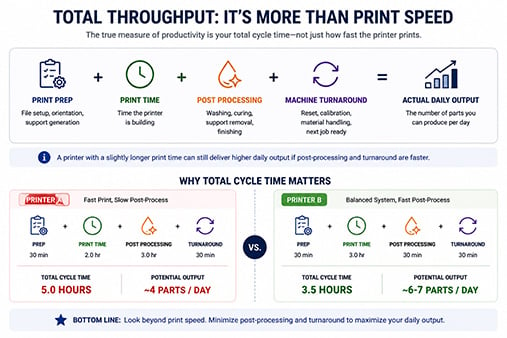
Speed matters—but raw print speed is only part of the equation. Throughput describes how many parts you can produce in a given timeframe, including setup, printing, and post-processing. A fast printer with a lengthy post-processing workflow may not actually deliver faster results.
 What Factors Affect Total Throughput?
Total throughput depends on several factors working together:
- Print preparation: How long does it take to orient parts, generate supports, and send jobs to the printer?
- Build time: The actual printing duration for your typical part geometries and batch sizes.
- Post-processing: Time required for support removal, cleaning, curing, and finishing.
- Turnaround between builds: How quickly can you start the next print job after the previous one?
B9Creations' B9Create software streamlines the entire print preparation workflow with automated orientation, support generation, and production scheduling. This reduces operator time and helps teams maintain consistent throughput across multiple daily builds.
How Do You Calculate Realistic Daily Output?
Ask vendors for typical print times on parts similar to your common geometries. Then add post-processing time for each technology. A printer that completes builds in 2 hours but requires 3 hours of post-processing delivers different throughput than one that takes 3 hours to print with 30 minutes of finishing. For high-volume prototyping environments, consider whether you need multiple printers running in parallel for high mix-low volume or one larger system with batch printing capabilities for low mix-high volume.
How Do Material Options Affect Your Prototyping Capabilities?
Materials determine what you can actually test with your prototypes. A printer with limited material options may force you to outsource prototypes that require specific mechanical properties, clarity, or temperature resistance.
What Material Properties Matter for Functional Prototypes?
For engineering prototypes, consider these material characteristics:
- Mechanical strength: Tensile strength, impact resistance, and flexural modulus for load-bearing parts.
- Temperature resistance: Heat deflection temperature for prototypes exposed to elevated operating temperatures.
- Chemical resistance: Compatibility with solvents, fuels, or cleaning agents the final product will encounter.
- Clarity and color: Transparent or colored materials for visual inspection and consumer product prototypes.
Should You Prioritize Open or Closed Material Systems?
Closed material systems restrict you to the manufacturer's proprietary resins or filaments. Open systems allow third-party materials, expanding your options but potentially complicating quality control and support.
B9Creations' B9 Core Series supports third-party materials alongside optimized proprietary resins—giving engineering teams the flexibility to source specialty materials while maintaining validated print profiles for consistent results. The B9Captivate toolkit enables material development for custom chemistries and application-specific performance.
How Do You Assess Workflow Integration and Software Compatibility?
A 3D printer doesn't operate in isolation. It needs to integrate with your existing CAD tools, file management systems, and post-processing workflows. Poor integration creates obstacles that slow down your entire prototyping operation.
What File Formats Should the Printer Accept?
At minimum, your printer should accept STL files—the standard export format from nearly all CAD programs. Some printers also support OBJ, 3MF, and native CAD formats, such as STEP files. B9Creations FAST(TM) Technology enables lossless data transfer from your .STL files to the printer itself, ensuring high CAD fidelity, discussed in our whitepaper.
How Important Is Slicing and Print Preparation Software?
Slicing software converts your 3D model into printer instructions. The quality of this software significantly affects your daily experience. Look for:
- Automatic orientation: Software that suggests optimal part orientation for accuracy and support minimization.
- Support generation: Intelligent support structures that remove cleanly without damaging part surfaces.
- Build estimation: Accurate predictions of print time and material consumption.
- Queue management: The ability to schedule multiple jobs and manage printer utilization.
B9Creations' B9Create software addresses each of these requirements with an interface designed for production environments. Teams can automate workflows, reduce manual intervention, and maintain consistent quality across high-volume operations.
What Should You Consider for Total Cost of Ownership?
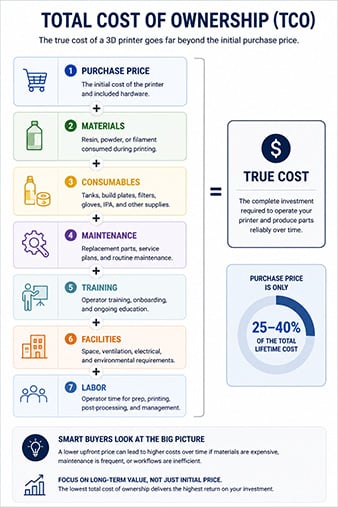
The purchase price represents only a fraction of what you'll spend on a 3D printer over its lifespan. Understanding total cost of ownership helps you make decisions that align with your budget and volume requirements.
What Ongoing Costs Should You Factor In?
Beyond the initial equipment investment, plan for:
- Materials: Resins, filaments, or powders consumed during printing. Calculate cost per part for typical geometries.
- Consumables: Build plates, resin tanks, filters, and other components that require periodic replacement.
- Maintenance: Service contracts, spare parts, and technician time for repairs and calibration.
- Training: Operator training for safe and effective use, including software proficiency.
- Facilities: Ventilation, temperature control, and workspace requirements.
How Do You Calculate Cost Per Part?
Request detailed material consumption data from vendors for parts similar to your typical prototypes. Include support material and any waste in your calculations. For resin printers, factor in tank replacement frequency and build plate wear.
Compare cost per part across technologies, not just material prices per liter or kilogram. A more expensive material that requires less post-processing may deliver lower total part costs.
What Questions Should You Ask During Vendor Evaluation?
Once you've narrowed down your technology preferences, use these questions to evaluate specific vendors and systems.
Technical Performance Questions
- What is the documented dimensional accuracy for parts similar to our typical geometries?
- Can you print sample parts from our CAD files for us to measure and test?
- What is the typical print time for a [specific part volume] at [target resolution]?
- What post-processing steps are required, and how long does each take?
Reliability and Support Questions
- What is the expected uptime for this printer in a production environment?
- What is your average response time for technical support requests?
- Do you offer on-site service, or is all support handled remotely?
- What warranty terms apply, and what does the warranty cover?
Workflow and Integration Questions
- Which CAD file formats does your software support?
- Can the printer integrate with our existing print management systems?
- How does your software handle multi-part builds and job queuing?
- What training resources are included with the purchase?
How Do You Match Printer Capabilities to Specific Applications?
Different applications prioritize different performance characteristics. Use this section to match your primary use cases with the specifications that matter most.
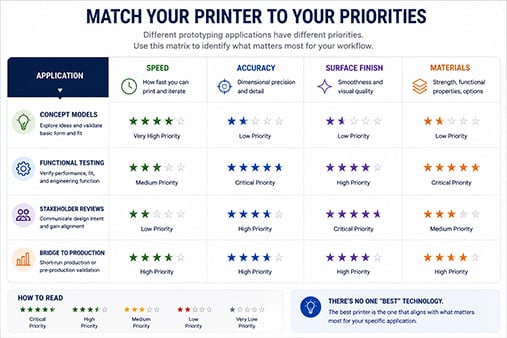
Concept Models and Early-Stage Prototypes
Priority factors: Speed, low cost per part, ease of use.
For early concept validation, you need fast turnaround more than perfect accuracy. Look for printers with quick print modes and materials that are inexpensive enough for multiple iterations.
Functional Prototypes for Engineering Validation
Priority factors: Dimensional accuracy, material properties, surface finish.
Functional prototypes must perform like the final product. Prioritize accuracy specifications, and verify that available materials match your mechanical and thermal requirements.
Production-Quality Prototypes for Stakeholder Review
Priority factors: Surface finish, detail reproduction, color and appearance options.
When prototypes need to look like final products for executive presentations or customer reviews, surface finish becomes critical. Resin-based DLP and SLA technologies excel here.
Bridge Production and Low-Volume Manufacturing
Priority factors: Throughput, consistency, total cost of ownership.
When you need dozens or hundreds of identical parts, consistency between builds and efficient batch printing become essential. B9Creations' blog covers production applications where DLP technology delivers repeatable results at scale.
 How Should You Test Printers Before Making a Final Decision?
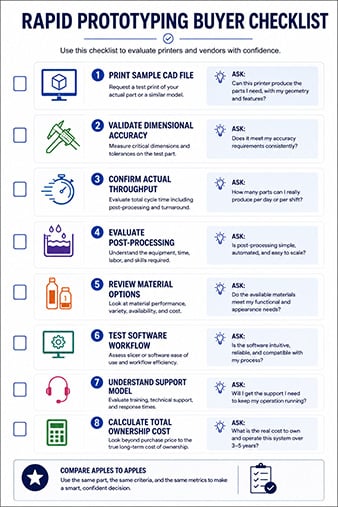
Hands-on testing reveals what specifications and demos cannot. Before committing to a purchase, evaluate real-world performance with your actual prototyping requirements.
Request Benchmark Parts
Send vendors CAD files representing your typical prototypes—including challenging features like thin walls, small holes, and complex curves. Compare the results side by side for accuracy, surface finish, and feature reproduction.
Evaluate Post-Processing Requirements
Ask to perform (or observe) the complete post-processing workflow for your benchmark parts. Time each step and assess how much manual intervention is required. Clean, simple post-processing translates to higher daily throughput and lower labor costs.
Test Software Usability
Spend time using the print preparation software yourself. Import your CAD files, set up builds, and evaluate how intuitive the interface feels. Clunky software creates daily frustration that accumulates over thousands of print jobs.
What Common Mistakes Should You Avoid When Selecting a 3D Printer?
Engineering teams often make preventable mistakes during the selection process. Here are the most common pitfalls and how to avoid them.
Overweighting Resolution at the Expense of Speed
Ultra-high resolution sounds impressive in specifications but may not matter for your actual parts. If 50-micron layers meet your accuracy needs, a printer that offers 25-micron layers but runs twice as slowly may not be the right choice.
Ignoring Post-Processing Time in Throughput Calculations
A 2-hour print followed by 4 hours of post-processing delivers lower throughput than a 4-hour print with 1 hour of finishing. Always calculate total cycle time, not just build time.
Selecting Based on a Single Application
Your prototyping needs will evolve. A printer that handles only one application type may become a bottleneck as projects change. Prioritize versatility alongside your primary use case.
Underestimating Training and Onboarding Time
Complex systems require significant operator training to achieve optimal results. Factor training time and learning curves into your implementation timeline, especially if multiple team members will use the equipment.
How Do You Build a Business Case for a 3D Printer Investment?
Convincing stakeholders to approve a 3D printer purchase requires a clear business case that quantifies the value beyond equipment costs.
Calculate Time Savings
Document how long your current prototyping process takes, including outsourcing lead times and shipping delays. Compare this to in-house production timelines with the proposed system. Convert time savings to project cost reductions.
Quantify Iteration Benefits
Faster prototyping enables more design iterations before production. More iterations typically correlate with better final products and fewer costly late-stage changes. Even one avoided tooling revision can justify significant equipment investment.
Consider Competitive Advantages
Faster time-to-market means capturing revenue earlier and responding to market changes more quickly. These strategic benefits may outweigh the direct cost savings in your business case.
In Conclusion: Building Your 3D Printer Selection Framework
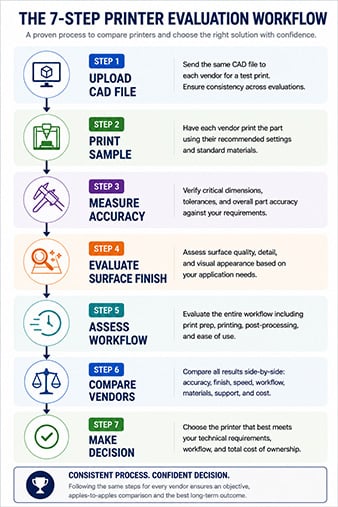
Choosing the right 3D printer for rapid prototyping requires balancing multiple factors: technology type, accuracy, speed, materials, workflow integration, and total cost of ownership. No single printer excels at everything, so clarity about your priorities helps you make the right trade-offs.
Start by documenting your most common prototyping scenarios and the performance characteristics each requires. Use this information to shortlist technologies, then evaluate specific vendors with benchmark testing and detailed questions.
B9Creations gives engineering teams access to high-speed DLP 3D printing with the resolution, material flexibility, and software tools that production environments demand. Request sample parts printed from your own CAD files to see how B9Creations systems perform on your actual prototyping challenges.
FAQs About How to Choose a 3D Printer for Rapid Prototyping
What 3D printing technology is fastest for rapid prototyping?
DLP (Digital Light Processing) typically delivers the fastest print times for high-resolution parts because it cures entire layers at once rather than tracing each point individually. B9Creations' DLP printers print up to 4x faster than industry averages, helping teams complete more iteration cycles per day.
How much accuracy do I need for functional engineering prototypes?
Most functional prototypes require dimensional accuracy between ±0.1mm and ±0.2mm. Tighter tolerances matter for press-fit assemblies or precision mechanisms. B9Creations' B9 Core Series delivers production-grade accuracy for prototypes that must validate real-world fit and function.
Should I buy one large printer or multiple smaller printers?
Multiple smaller printers often deliver better throughput and redundancy than a single large system. If one printer requires maintenance, others keep production running. However, large printers handle oversized parts that smaller systems cannot accommodate.
What is the difference between open and closed material systems?
Closed systems restrict you to manufacturer-approved materials, ensuring validated print profiles but limiting options. Open systems accept third-party materials, expanding your choices. B9Creations supports both proprietary and third-party materials, balancing flexibility with validated performance.
How do I calculate the true cost per part for 3D printing?
Include material consumption (including supports), consumable wear, operator time for setup and post-processing, and allocated equipment depreciation. This total gives you a realistic cost basis for comparing in-house printing to outsourced services.
What training is required to operate a professional 3D printer?
Most professional printers require 2-8 hours of initial training covering equipment operation, software use, material handling, and post-processing. B9Creations includes training resources with equipment purchases to help teams achieve optimal results quickly.


