

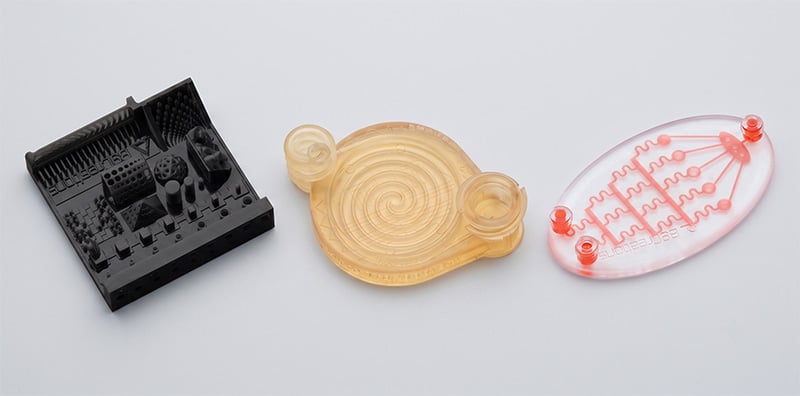
Micro 3D printing has matured into a practical manufacturing technology for producing precision components used in medical devices, microfluidics, electronics, research, and advanced manufacturing. While resolution is often the first specification buyers compare, it rarely tells the full story. This guide explains how to evaluate micro 3D printing technologies across resolution, dimensional accuracy, speed, materials, workflow, cost, and ease of use so you can choose the system that best fits your application—not just the one with the smallest micron number.
A practical comparison of precision, tolerance, speed, build volume, workflow, materials, cost, and ease of use
Download the Elite Micro 3D Printer Comparison Guide | Request a Sample Part
Micro 3D printing has moved beyond the question of whether micron-scale parts can be printed. Multiple industrial platforms can now produce highly detailed components for medical devices, electronics, microfluidics, connectors, research, and short-run production. The harder question is which system can produce the features your application requires at the speed, cost, and level of operational complexity your organization can support.
Most micro 3D printer comparisons still begin and end with resolution. That creates an incomplete, and sometimes misleading, picture. A system with the smallest published pixel size may be the right choice when an application truly requires it. But it may also introduce tradeoffs in print time, equipment cost, workflow complexity, build volume, material handling, or operator dependence that are unnecessary for applications whose critical requirements fall in the 10-to-25-micron range.
This buyer’s guide compares three representative industrial 3D printing platforms — the B9Creations Elite Micro, Boston Micro Fabrication microArch S350, and Nano Dimension Fabrica 2.0 — and provides a broader framework for evaluating micro additive manufacturing technology. It focuses not only on what a machine can print, but also on what it takes for an engineering team to use the machine repeatedly and productively.
|
The central takeaway The best micro 3D printer is not automatically the one with the smallest resolution number. It is the system that meets the part’s real dimensional and material requirements while delivering an acceptable balance of throughput, workflow, cost, repeatability, and operator effort. |
Micro 3D Printer Comparison at a Glance
The specifications below show why micro 3D printers should not be treated as interchangeable. Each platform occupies a different position in the market and prioritizes a different balance of precision, scale, and productivity.
|
Category |
B9Creations Elite Micro |
BMF microArch S350 |
Nano Dimension Fabrica 2.0 |
|
Technology |
Digital Light Processing (DLP) |
Projection Micro Stereolithography (PµSL) |
Digital Light Processing (DLP) |
|
Build volume |
38.4 × 21.6 × 127 mm |
100 × 100 × 50 mm |
50 × 50 × 100 mm |
|
Published resolution |
20 µm native; 10 µm effective with FAST™ |
25 µm XY optical resolution |
1.9 µm |
|
Published tolerance / accuracy value |
±10 µm |
±1 µm XY positional accuracy; BMF currently lists ±50 µm tolerance for the S350 |
±50 µm in the comparison source |
|
Published print-time positioning |
Minutes to hours |
Hours to days to weeks |
Days to weeks |
|
Material type |
Photopolymer resin; B9 and third-party material pathways |
Photosensitive resins; BMF also describes third-party material use |
Photopolymer resin; open to third-party materials |
|
Light source |
UV LED, 385 nm |
UV LED, 405 nm |
Not listed in the comparison guide |
|
Integrated post-processing option |
B9Clean XL and B9 Model Cure XL |
Third-party equipment |
Third-party equipment |
|
Relative price positioning in comparison guide |
Lowest of the three |
4X Higher than B9 Elite Micro |
Highest |
|
Primary decision advantage |
10–25 µm application range with easiest workflow, fastest print speed, and lower acquisition cost, though smaller build area |
Larger XY build area on 25 µm production platform, though comes at slower print speeds and often requires calibrations between prints and entry of material settings between material changeover |
Very fine 1.9 µm resolution for applications that require it, though very expensive and may no longer be supported |
Note: Published specifications are not always measured under identical materials, geometries, orientations, or test methods. Resolution, positional accuracy, dimensional tolerance, and minimum feature size are related but different metrics. Buyers should use published data to narrow the field, then validate performance with their own part geometry and acceptance criteria.
Why Resolution Alone Is an Incomplete Buying Criterion
Resolution is usually the first number buyers see, and it is easy to understand why. A smaller pixel or voxel suggests the ability to reproduce smaller details. In micro additive manufacturing, however, the smallest number on a specification sheet does not necessarily predict the dimensional performance, productivity, or usability of the complete process.
A more useful evaluation separates four related concepts:
- Resolution describes the nominal size of the projected pixel, laser spot, or voxel used to create the part.
- Minimum feature size describes the smallest wall, channel, hole, overhang, or isolated feature that can be produced reliably under defined conditions.
- Accuracy describes how closely a printed dimension matches the intended CAD dimension.
- Tolerance describes the allowable or published range of dimensional variation under the manufacturer’s stated conditions.
A printer can advertise extremely fine resolution while the finished component is influenced by material behavior, light scattering, exposure strategy, support placement, orientation, shrinkage, cleaning, curing, and measurement methodology. Conversely, a system with a larger native pixel may use optical and software techniques to produce effective feature performance below that native value for suitable geometries.
The right question is therefore not “Which machine has the lowest micron number?” It is “Which system can repeatedly produce my critical features and dimensions in my required material, within my required cycle time?”
The Market Is Not One Continuous Resolution Race
Micro 3D printing encompasses several technology classes. At one end are research and microfabrication platforms designed for extremely small features, including sub-micron structures. At the other are conventional industrial photopolymer systems that may offer good surface quality but cannot consistently resolve the small channels, walls, or details required for true microscale applications.
Between those extremes is a large and commercially important application space: parts that need more precision than conventional industrial 3D printing, but do not require the cost or process profile of an ultra-specialized sub-2-micron system. This includes many medical device components, microfluidic devices, electronics housings, precision connectors, miniature mechanical parts, tooling inserts, and research devices.
|
The 10–25 µm decision space When critical requirements fall between roughly 10 and 25 microns, the buying decision often shifts away from “Can the printer make anything smaller?” and toward “How quickly, reliably, and economically can our team produce the part?” |
Eight Criteria Buyers Should Compare
1. Required Feature Size and Dimensional Performance
Begin with the application, not the equipment. Identify the smallest critical walls, channels, holes, gaps, and radii in the design. Then identify which dimensions require tight control and which are merely visual details. A 2-micron platform may be essential for one optical or microfluidic feature and unnecessary for a connector, surgical instrument component, or miniature housing whose functional requirements sit comfortably above 10 microns.
Ask each vendor to print the same representative geometry in the material you intend to use. Measure multiple parts, not only one showcase sample, and distinguish repeatability from a single best-case result.
2. Published Tolerance, Accuracy, and Test Method
Tolerance claims belong in the comparison, but they should be read carefully. For example, BMF’s current S350 page lists ±1 µm XY positional accuracy and ±50 µm tolerance. Those values describe different aspects of machine and part performance and should not be treated as interchangeable. The B9Creations comparison guide lists ±10 µm for the Elite Micro 3D printer and ±50 µm for Fabrica 2.0 based on the cited public sources used when the guide was created.
A credible vendor discussion should clarify what the value means, the geometry and material used, whether it applies globally or locally, and whether post-curing is included. When possible, define an application-specific dimensional inspection plan before requesting benchmark parts.
3. Build Volume and Usable Throughput
Build volume matters, but the largest build envelope is not always the most productive choice. Buyers should compare how many of their actual parts fit in a build, whether the full area can be used at the required quality, how print time changes as the build is populated, and whether the machine’s height or XY area aligns with the part family.
The microArch S350 offers the largest XY area in this three-system comparison at 100 × 100 mm, making it attractive for applications that benefit from a broader platform. The Elite Micro provides a narrower 38.4 × 21.6 mm XY area with 127 mm of Z height. Fabrica 2.0 sits between them at 50 × 50 × 100 mm. The practical winner depends on part orientation, nesting density, and production mix—not cubic volume alone.
4. Print Speed and Time to a Finished Part
Manufacturers may report speed in millimeters per hour, estimated job time, or broad categories. None of those metrics is sufficient by itself. A fair comparison includes file preparation, printer setup, build time, part removal, washing, drying, curing, and any inspection or secondary processing required before the part can be used.
The B9Creations comparison guide positions Elite Micro 3D printer jobs in minutes to hours, S350 jobs in days to weeks, and Fabrica 2.0 jobs in days to weeks. Actual timing depends heavily on geometry, layer strategy, material, height, and quality settings. Buyers should request the full elapsed time for a representative part rather than relying on a generalized speed claim.
5. Ease of Use and Operator Dependence
This is one of the most consequential differences between micro 3D printing platforms—and one of the least visible on a specification sheet. Some systems are designed around extensive process control and allow experienced users to adjust customer parameters, exposure strategies, or material settings. That flexibility can be valuable in research and process-development environments. It can also increase the amount of expertise required to produce repeatable results.
Other systems are designed to move process knowledge into validated hardware, software, and material workflows. The goal is not to eliminate engineering judgment, but to reduce routine machine-specific intervention so more users can operate the equipment consistently.
|
Workflow question |
Why it matters |
What buyers should ask to see |
|
Time to first print |
Determines deployment speed and early adoption |
Unbox or initialize the machine, prepare a real file, load material, and begin a build |
|
Routine calibration |
Consumes engineering time and can create operator-to-operator variation |
Every calibration required at startup, after maintenance, and during normal use |
|
Material changeover |
Affects uptime, contamination risk, and multi-material productivity |
Complete a changeover between two validated materials |
|
Parameter entry |
Shows how much process knowledge lives with the operator |
Identify which values are selected automatically and which must be entered or tuned |
|
New-user training |
Determines whether the system can scale beyond one specialist |
Have a new operator prepare and launch a job |
|
Recovery and support |
Determines downtime when something goes wrong |
Demonstrate diagnostics, support escalation, and restoration to production |
The B9Creations workflow
B9Creations documents the Elite Micro 3D printer as out of the box and printing in 15 minutes with 5 button pushes and no user calibrations. The system is paired with print-preparation and monitoring software, factory startup assistance, plus integrated cleaning and curing options. This positioning is designed for organizations that want microscale capability without requiring every user to become a printer-process specialist.
The competitor workflow question
BMF describes the S350 as incorporating customer parameter settings. Those features may support control and process optimization, but buyers should still ask for a live demonstration of the complete operating workflow, including what changes after a print, during material changeover, or when a new material profile is introduced. The goal should be to understand the labor and expertise required to use that control successfully.
|
Do not compare polished demo parts alone Ask every vendor to complete the same operational tasks in front of your team. The number of manual decisions, calibration steps, parameter entries, and handoffs may have more impact on total productivity than a small difference in published resolution. |
6. Materials and Process Flexibility
Material choice often determines whether a printed part is merely visual or functionally useful. Compare not only the number of available resins, but also the mechanical, thermal, biocompatible, electrical, optical, and processing properties needed for the application.
An open-material pathway can be valuable for research teams, regulated product developers, and manufacturers with proprietary chemistry requirements. However, “open” can mean different things. Ask whether the user receives a documented development tool, whether settings can be created internally, whether the vendor develops settings as a service, and who supports the process if the third-party material fails.
B9Creations supports its own resins, third-party material pathways through B9Captivate, and custom material-development services. The right model depends on whether your priority is validated simplicity, broad experimentation, proprietary chemistry, or all three.
7. Post-Processing and the Complete Workflow
A micro 3D printer does not produce a finished part by itself. Washing, drying, curing, support removal, and inspection can influence final dimensions and surface quality. A buyer evaluating only the printer risks underestimating floor space, solvent handling, operator touch time, and process variability.
The Elite Micro 3D printer comes with dedicated B9Clean XL and B9 Model Cure XL options. For the S350 and Fabrica 2.0, the guide identifies third-party post-processing equipment. Buyers should evaluate the printer and post-processing equipment as one process.
8. Total Cost of Ownership
Purchase price is visible. Engineering labor is often hidden. The total cost of a micro 3D printing program may include equipment, installation, software, maintenance, materials, vats or consumables, wash and cure equipment, solvent, training, failed builds, calibration time, application development, quality inspection, and downtime.
The comparison guide positions Elite Micro 3D printer well below the S350 and Fabrica 2.0 in acquisition price, with Fabrica 2.0 at the highest relative tier. Exact pricing varies by configuration, geography, service package, and commercial terms, so buyers should request complete installed-system quotations.
A useful financial model converts operator involvement into dollars. If a specialized engineer spends several hours each week preparing, calibrating, tuning, or recovering the process, that labor should be included beside the equipment payment. A more expensive machine can be justified by a capability no other system provides. A lower-cost machine can deliver greater value when it meets the requirement with less labor and faster cycle times.
Where Each Platform Is Likely to Fit Best
No responsible comparison should declare one universal winner. The better approach is to identify which technical priority drives the purchase.
|
When the priority is… |
Platform to investigate |
Why |
|
The smallest published resolution in this comparison |
Nano Dimension Fabrica 2.0 or similar ultra-high resolution 3D printer |
Its published 1.9 µm resolution targets extremely fine microfabrication needs |
|
10–25 µm capability with rapid deployment, simplified operation, and lower acquisition cost |
B9Creations Elite Micro 3D printer |
It targets the middle ground between conventional precision printing and ultra-specialized microfabrication |
|
Broad experimentation and user-defined process development |
Evaluate material and parameter access across vendors |
The best choice depends on how much control, documentation, and vendor support the organization needs |
|
Repeatable use by multiple engineers or production operators |
Evaluate live workflow, calibration, and training |
Operational design may matter more than the nominal pixel size once technical requirements are met |
A Better Vendor Evaluation Process
Specification tables are useful for eliminating systems that clearly cannot meet the requirement. They should not make the final decision. A structured evaluation creates a more defensible result and reduces the risk of buying either too little capability or far more capability than the application needs.
Step 1: Define the part requirements
- Identify critical dimensions, minimum features, acceptable tolerance, and surface requirements.
- Define the target material properties and any biocompatibility, thermal, electrical, or regulatory requirements.
- Estimate expected prototype volume, production volume, and part-family variation.
- Document the maximum acceptable elapsed time from file release to a usable part.
Step 2: Send the same benchmark package to each vendor
- Provide identical STL or native geometry and clearly marked critical dimensions.
- Request the intended production material or the closest technically relevant alternative.
- Request more than one part or more than one build so repeatability can be assessed.
- Ask the vendor to disclose orientation, supports, layer strategy, post-processing, and any manual compensation.
Step 3: Observe the workflow
- Watch file preparation and job setup rather than only the print already in progress.
- Count required user decisions and manual inputs.
- Ask what must be recalibrated, retuned, cleaned, or re-entered during normal operation.
- Have a likely day-to-day user participate in the demonstration.
Step 4: Calculate full program cost
- Include printer, software, installation, service, post-processing, facilities, consumables, and inspection equipment.
- Estimate engineering and operator labor for training, setup, material changeover, maintenance, and troubleshooting.
- Compare cost per acceptable part at realistic utilization—not maximum theoretical utilization.
- Assign a value to development time saved or production delays avoided.
Step 5: Make the decision against weighted requirements
Weight criteria before reviewing final quotations. A medical device team may emphasize material documentation and dimensional repeatability. A research lab may prioritize open parameters and experimental flexibility. A production operation may prioritize cycle time, uptime, operator simplicity, and service response. Predefined weights reduce the temptation to choose based on the most visually impressive sample or the smallest single specification.
Questions Every Micro 3D Printer Vendor Should Answer
- What is the smallest feature you will guarantee in my selected material—not only the nominal resolution?
- What published tolerance or accuracy value applies to my part size and geometry?
- What test method and post-processing conditions support that value?
- How long does my representative job take from file preparation through final cure?
- How long does it take a new user to launch a successful print?
- Which calibrations are performed by the user, and how often?
- What changes after a material changeover?
- Which parameters are automatically controlled, selected from validated profiles, or entered manually?
- Can the platform support third-party materials, and who develops and supports the settings?
- What post-processing equipment and process documentation are included?
- What happens when the primary trained operator is unavailable?
- What service response, replacement strategy, and ongoing technical support are included?
- Can you produce multiple builds of our own part for dimensional review?
What the Specification Sheet Still Cannot Tell You
Micro additive manufacturing is an interaction between hardware, optics, software, material chemistry, geometry, orientation, and post-processing. That means the final decision should always return to the application.
A system with superior nominal resolution may be the only viable option for an extremely fine structure. Another system may produce a 15- or 20-micron feature more quickly, with less operator effort, and at a substantially lower cost. Both can be excellent technologies while serving different buying priorities.
This is also why ease of use deserves the same seriousness as speed and resolution. When only one specialist can operate a machine, the organization does not truly own a scalable capability; it owns a capability tied to an individual. When setup, calibration, and parameter knowledge are standardized or automated, the printer can become part of the broader engineering and production workflow.
Where the B9 Elite Micro 3D Printer Fits
The B9 Elite Micro 3D printer is not positioned as the solution for every application requiring the smallest feature attainable by any commercial technology. Its value proposition is different: provide production-quality microscale capability within the 10-to-25-micron range while reducing barriers that often make micro additive manufacturing expensive or specialist-dependent.
For suitable applications, that combination can include:
- 20 µm native and 10 µm effective resolution with FAST™ technology
- ±10 µm tolerance
- Printtime in minutes to < an hour in most cases
- Out-of-the-box printing in 15 minutes with 5 button pushes
- No user calibration
- Open to B9, third-party, and custom material
- integrated cleaning and curing options
- Factory startup assistance and lifetime technical support
- Application and material consultation
For an application requiring under 5-micron resolution, those capabilities may outweigh B9Creations’ workflow and cost advantages. For applications that fit the Elite Micro’s dimensional range, however, buyers should evaluate whether paying for a more specialized capability also introduces time, complexity, and cost that the part does not require.
Frequently Asked Questions
What is the best micro 3D printer?
There is no single best system for every application. The right choice depends on required feature size, dimensional performance, build volume, material, throughput, workflow complexity, and budget. Fabrica 2.0 targets extremely fine resolution and the Elite Micro 3D printer targets accessible 10–25 µm printing with a simplified workflow.
Is lower micron resolution always better?
No. Lower nominal resolution can enable smaller details, but it may not improve a part whose functional features are larger. Buyers should compare reliable minimum feature size, accuracy, tolerance, speed, and the complete production workflow.
What is the difference between resolution and tolerance?
Resolution describes the nominal imaging or exposure size used to create a part. Tolerance describes the expected dimensional variation under stated conditions. A machine may have fine resolution while the printed part is still affected by material behavior, geometry, orientation, curing, and measurement method.
How should I compare print speed?
Use the same representative part and include file preparation, setup, printing, removal, washing, drying, curing, and inspection. A millimeters-per-hour figure or broad speed category does not describe the entire time to a usable part.
Why does calibration matter?
Calibration takes time and can create dependence on trained specialists. It may also be necessary for some high-control systems or workflows. Buyers should understand which tasks are performed automatically, by the vendor, or by the user during routine operation.
Can micro 3D printers use third-party materials?
Some can, but openness varies. Ask whether the system provides user-accessible development tools, vendor-developed profiles, documentation, and support for the final process—not only whether resin can physically be placed in the machine.
How should I validate a printer before buying?
Have each vendor print your geometry in a relevant material. Measure critical features across multiple parts or builds, document elapsed workflow time, and have the intended operators observe or perform the setup process.
When does a 10–25 µm system make more sense than a sub-2-micron system?
When the part’s functional requirements are comfortably within the 10–25 µm range, a system optimized for speed, usability, and lower cost may deliver a better business outcome than paying for resolution the application does not use.
Conclusion: Buy the Capability Your Team Can Actually Use
The micro 3D printing market now offers impressive choices across a wide range of resolutions and operating models. That makes buying decisions more nuanced—not less. Resolution remains important, but it should be evaluated alongside tolerance, build volume, elapsed production time, material compatibility, post-processing, support, total cost, and the amount of expertise required from the operator.
The strongest purchasing process begins with the part, validates published claims with representative samples, and evaluates the complete workflow in front of the people who will use it. That approach protects buyers from both under-specifying the technology and overpaying for capability that does not improve the application.
|
Final decision rule Do not ask only what the printer can produce under ideal conditions. Ask what your team can produce repeatedly, economically, and confidently after the demonstration is over. |
Compare the Platforms in More Detail
Review the B9Creations Elite Micro, BMF microArch S350, and Nano Dimension Fabrica 2.0 across build volume, technology, print speed, resolution, tolerance, materials, post-processing, price positioning, and support.
Download the B9Creations Elite Micro 3D Printer Comparison Guide
Specifications Narrow the Field. Your Part Makes the Decision.
Request an application evaluation or sample part to determine whether the Elite Micro’s precision, materials, throughput, and workflow align with your design and production requirements.
Request a Sample Part or Micro 3D Printing Consultation
Sources and Publication Notes
- B9Creations, Elite Micro Comparison Guide
- B9Creations, Elite Series product page
- B9Creations, Micro Applications
- B9Creations, Biocompatible Micro 3D Printing in 2026 Full Guide
|
Editorial disclosure B9Creations manufactures the Elite Micro 3D printer platform evaluated in this guide. The purpose of this article is not to claim that one micro 3D printer is universally best. It is to help buyers compare the technical and operational tradeoffs that determine whether a system is the right fit for a specific application. Competitor specifications are drawn from publicly available manufacturer materials and the linked B9Creations comparison guide. Workflow claims about the B9 Elite Micro 3D printer reflect B9Creations’ documented operating process. |


